
Published
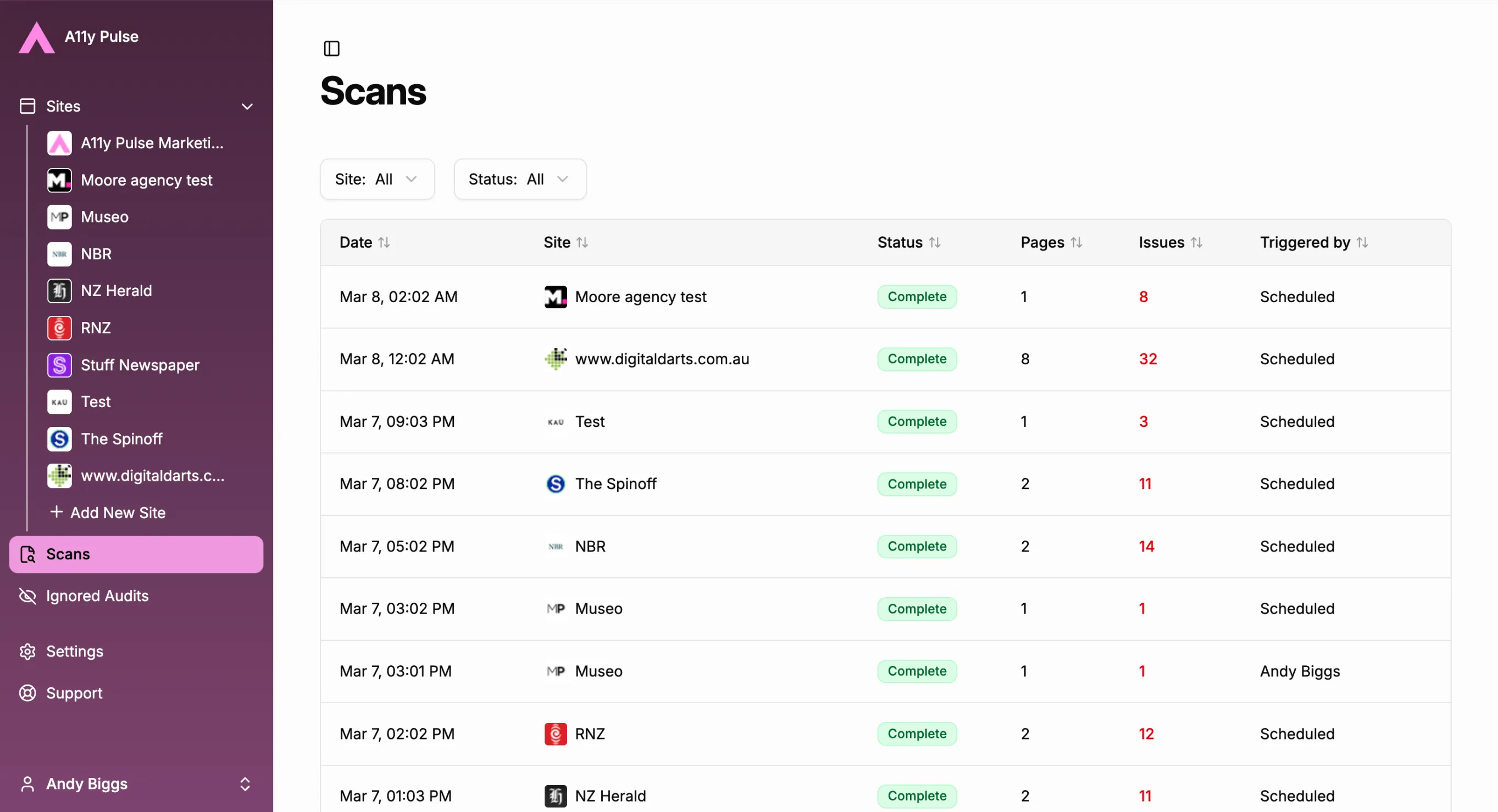
Accessibility isn’t a one-time fix. It’s an ongoing process — sites change, new pages get added, code gets updated. That’s why A11y Pulse runs automated scans on a schedule, so you always know where your sites stand.
But until now, there wasn’t a great way to look back. If a scan ran last Tuesday and you wanted to check what it found, or figure out why it might have failed, you had to dig around. There was no single view of your scan history across all your sites.
That changes today.
Introducing the Scan Dashboard
The Scan Dashboard gives you a full history of every scan A11y Pulse has run across all your sites, in one place.
For each scan you can see the date and time it ran, which site it was for, whether it completed successfully, how many pages were scanned, and how many issues were found. You can filter the list by site or by scan status, so it’s easy to zero in on exactly what you need.
Going Back in Time
The real value here is the ability to look back. Accessibility is something that can regress — a developer ships a change, a new component gets added, and suddenly pages that were clean are flagging issues again.
With scan history, you can pinpoint exactly when something changed. If your issue count spikes on a particular date, you can trace it back to the scan, see which pages were affected, and connect it to whatever was deployed around that time. That kind of visibility turns accessibility from a vague ongoing concern into something you can actually investigate and act on.
It’s also useful for the opposite reason. When your team puts work into fixing issues, you can look back and see the before and after. Scan history makes your progress visible.
Spotting Failed Scans
Scans don’t always complete perfectly. Pages can time out, authentication can lapse, or a site configuration change can interfere with the crawler. Without a history view, a failed scan could go unnoticed — meaning you’d lose coverage without realising it.
The Scan Dashboard makes failed scans obvious. Filter by status and you’ll immediately see if something went wrong and when, so you can investigate and get things back on track.
Try It Now
The Scan Dashboard is live for all A11y Pulse users. Head to the Scans section in your sidebar to explore your history.
Not using A11y Pulse yet? Sign up for a free trial and see how easy it is to bring continuous accessibility testing into your team's workflow.
Questions? We would love to hear from you. Drop us a line at [email protected].