Integrate accessibility data into any tool in your stack
Pull scan results and manage sites programmatically. The A11y Pulse REST API gives your tools direct access to your accessibility data.
Your accessibility data, anywhere
The A11y Pulse API gives you full programmatic access to your scan results. Pull issue lists into your project management tool, monitor for regressions in your CI pipeline, or build custom dashboards, all over a simple REST API.
- List sites, scans, and issues with filtering and pagination
- Compare scan results to track regressions over time
- Retrieve issue details including WCAG rule, severity, and element
// https://api.a11ypulse.com/v1

// Sites
GET  /sites                    List all sites
GET  /sites/{id}               Get site details
GET  /sites/{id}/latest-scan   Full scan with all issues
GET  /sites/{id}/pages         List pages for a site

// Pages
GET  /pages/{id}               Get page details
GET  /pages/{id}/latest-scan   Full scan for a single page

// Scans
GET  /scans                    List scans across all sites
GET  /scans/{id}               Get a scan with page details
Simple, predictable REST
All endpoints follow REST conventions with JSON responses. Authenticate with a Bearer token from your account settings. No OAuth flows, no SDK required. Works with any HTTP client.
// GET /v1/sites/{id}/latest-scan
{
  "data": {
    "id": "sc_k9mxp2",
    "siteId": "si_r4tz8w",
    "status": "complete",
    "createdAt": "2026-05-03T09:00:00.000Z",
    "completedAt": "2026-05-03T09:04:12.000Z",
    "auditSummary": {
      "issues": 34,
      "ignored": 2,
      "incomplete": 6,
      "inapplicable": 114,
      "passes": 278
    },
    "pages": [
      {
        "id": "pg_hq7n3c",
        "name": "Home",
        "url": "https://example.com/",
        "auditSummary": {
          "issues": 12,
          "ignored": 0,
          "incomplete": 3,
          "inapplicable": 98,
          "passes": 201
        },
        "issues": [
          {
            "id": "color-contrast",
            "title": "Elements must have sufficient color contrast",
            "impact": "serious",
            "nodeCount": 8,
            "nodes": [
              {
                "target": ".nav-link",
                "html": "<a class=\"nav-link\" href=\"/about\">About</a>",
                "impact": "serious",
                "failureSummary": "Fix any of the following:\n  Element has insufficient color contrast of 2.54\n  (foreground: #767676, background: #ffffff)\n  Expected contrast ratio of 4.5:1",
                "xpath": "/html/body/nav/ul/li[2]/a"
              }
            ]
          }
        ]
      }
    ]
  }
}
CI/CD and deployment integration
Pull your latest scan results to check for regressions and gate your deployments. The API makes accessibility a first-class part of your release process.
- Compare violations between two scans to detect regressions
- Return non-zero exit codes to block deploys on new issues
- Pull issue counts and severity breakdown programmatically
The process
How it works
Get your API key
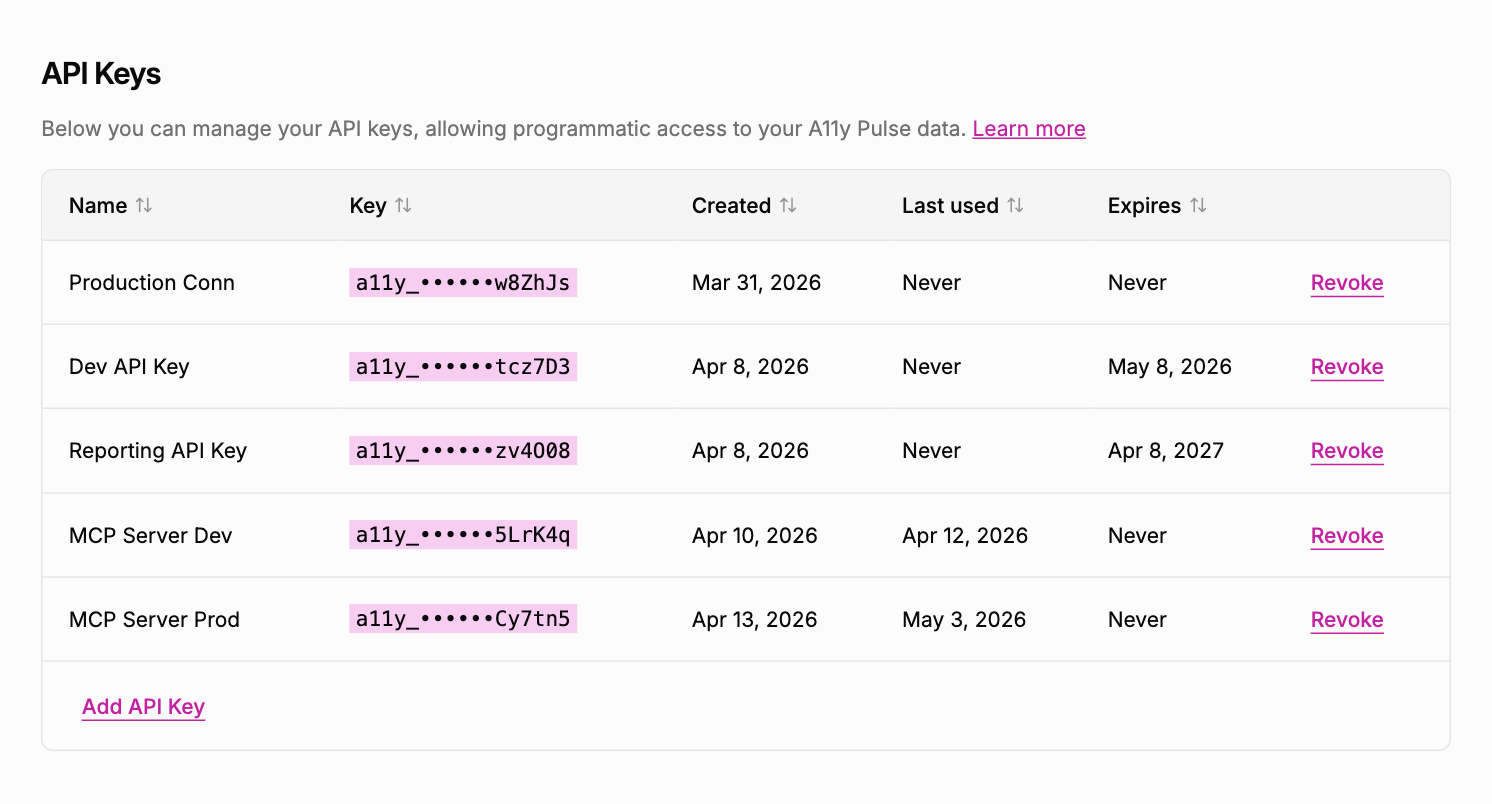
Generate a Bearer token from your account settings. One token covers all your sites, with no per-site credentials to manage.
Make your first request
Call any endpoint with your Bearer token in the Authorization header. JSON responses, standard HTTP status codes, no surprises.
Build your integration
Pull data into your dashboards, monitor for regressions in CI, or push issues into your project management tool. The API is the same one A11y Pulse itself uses.
You can list your sites, retrieve the latest scan for a site, get a full list of violations with filtering by severity and WCAG rule, and compare violations between two scans.
Generate an API token from Settings → Integrations. Include it in every request as a Bearer token: Authorization: Bearer <your-token>. You can set an expiry or revoke tokens at any time.
Yes. 60 requests per minute on all plans. If you need higher limits for CI/CD integrations, contact us.
Not yet. The API is plain REST and works with any HTTP client. We're considering an official CLI tool; if that would help you, let us know.
Yes. Pull your latest scan results and compare violations to a previous scan. Return a non-zero exit code if new issues are detected to block the deploy.
Start integrating accessibility data in minutes
No credit card. No setup. Just your URL and a clear list of issues to fix.
Get your API key