Fix accessibility issues without leaving your AI editor
Connect A11y Pulse to Claude, Cursor, or any MCP-compatible AI coding agent. Get accessibility issues surfaced directly in your editor and fix them with AI assistance.
Accessibility issues, inside your AI editor
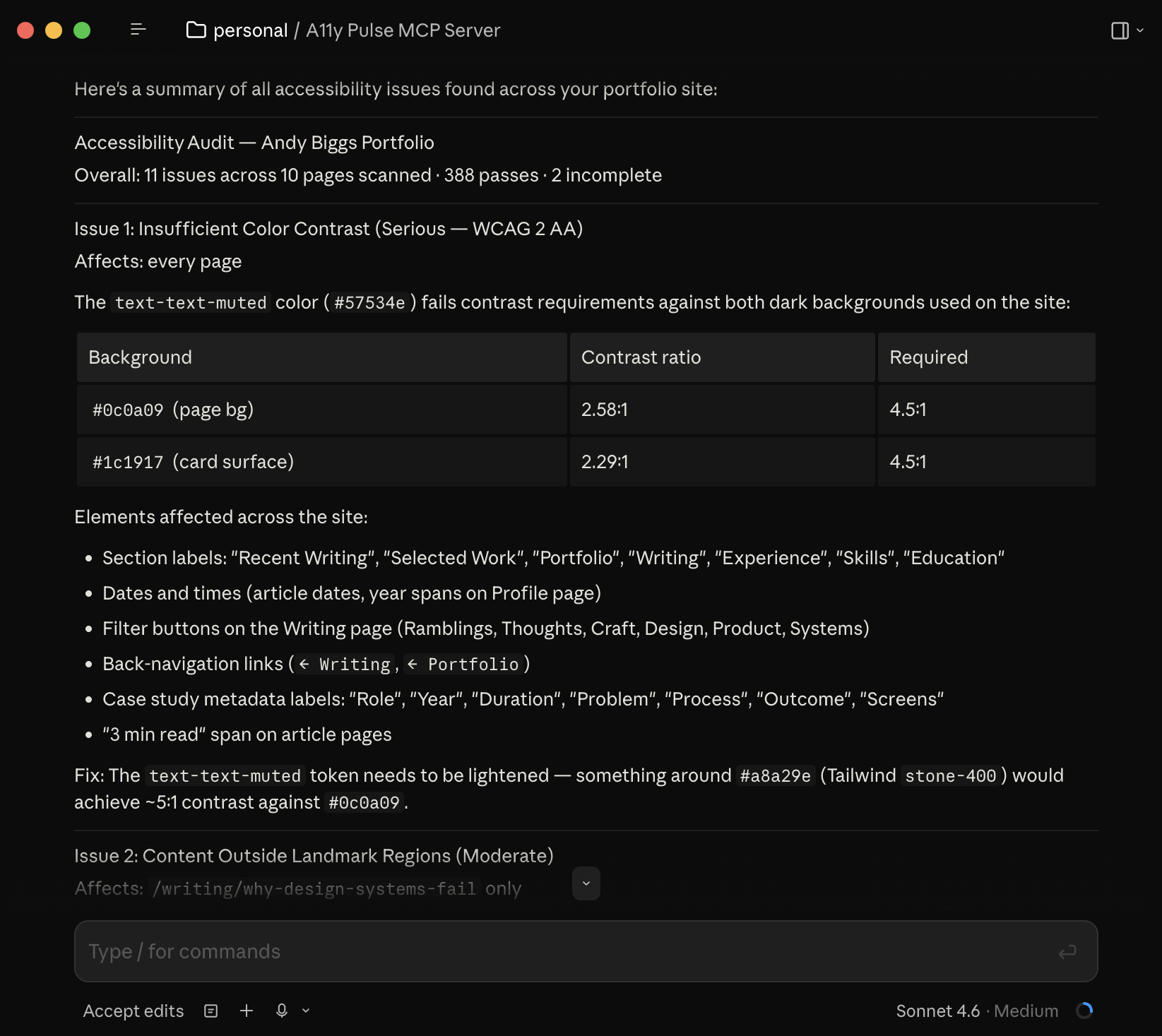
The A11y Pulse MCP server exposes your scan data as tools that AI coding agents can call. Ask your agent about accessibility issues, and it queries your live scan data, with no copy-pasting from the dashboard.
- Get latest scan results for any site or page
- Filter issues by severity, WCAG rule, or page
- Ask your agent to fix specific issues directly in your code
Works with the AI tools you already use
The MCP server is compatible with any editor or agent that supports the Model Context Protocol. Works with Claude Code, Cursor, and other MCP-compatible tools.
// Available MCP tools
get_sites               →  List all sites in your account
get_latest_scan         →  Get the latest scan results for a site
get_page_scan           →  Get issues for a specific page URL
fix_page_accessibility  →  Fix issues on a specific page
fix_site_accessibility  →  Fix issues across all pages in a site
add_site                →  Add a new site to A11y Pulse
update_site             →  Update an existing site's settings
add_pages               →  Add pages to an existing site
start_scan              →  Queue a fresh scan for a site
wait_for_scan           →  Wait for a scan to finish and return results
From issue to fix without leaving your flow
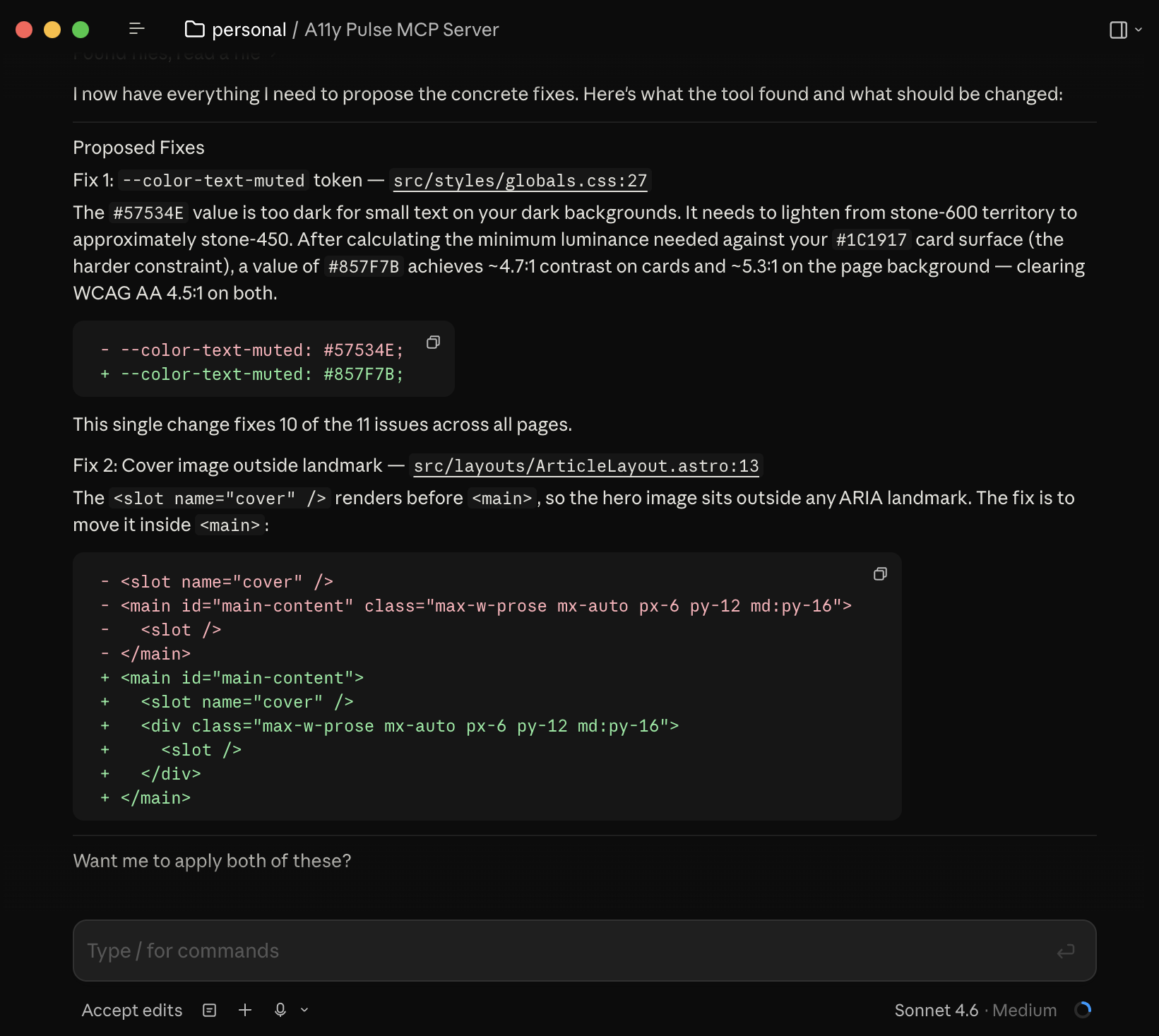
Instead of switching to the A11y Pulse dashboard, finding the issue, copying the element selector, going back to your editor. Just ask. The MCP server ships with built-in accessibility expertise, telling your agent how to interpret each violation, trace the flagged element back to the right source component, and generate a correct fix, not a guess.
- Agent reads your real scan data, not a generic ruleset
- Fixes are proposed in the context of your existing code
- Trigger a fresh scan after fixing to confirm the issue is resolved, all from your editor
The process
How it works
Install the MCP server
Add the A11y Pulse MCP server to your editor's MCP configuration with your API key. One-time setup that takes about 2 minutes.
Ask about your accessibility issues
In your editor, ask your AI agent: "What accessibility issues does my site have?" or "Fix the accessibility issues on the checkout page." The agent calls A11y Pulse tools to get real data.
Fix and verify
The agent proposes code fixes based on your actual issues. Accept the changes, then trigger a rescan to confirm the issue is resolved, all without leaving your editor.
MCP (Model Context Protocol) is an open standard that lets AI coding agents call external tools and APIs. A11y Pulse's MCP server exposes your scan data as tools that MCP-compatible AI editors can call directly.
Claude Code (Anthropic's CLI), Cursor, and any other editor that implements the Model Context Protocol. The list of compatible tools is growing quickly.
Add the A11y Pulse MCP server configuration to your editor's MCP settings file with your API key. Full setup instructions are in our MCP server docs and it takes about 2 minutes.
Both, and more. The get_* tools read your scan data. The fix_* tools ask your AI agent to propose code changes based on specific issues. The add_* tools let your agent add new sites and pages directly. The start_scan and wait_for_scan tools let your agent kick off a fresh scan after fixing issues and wait for the results.
Yes. Your A11y Pulse API key has three permissions: Read access, Manage sites & pages, and Trigger scans. Grant only the ones you want your agent to have. A read-only key keeps the MCP server limited to fetching scans and suggesting fixes, useful if you don't want an agent able to add sites or trigger scans on your behalf.
Yes. The MCP server connects to your A11y Pulse account using an API key. You need an active account with at least one site added and scanned.
Fix accessibility issues without leaving your AI editor
No credit card. No setup. Just your URL and a clear list of issues to fix.
Connect your agent