How to automate testing of focus appearance for WCAG 2.4.7

Focus appearance or focus indicators are a critical part of web accessibility. They are visual cues that show keyboard users where they are on the page. Modern web browsers provide a default indicator for focusable elements, but many websites either remove the indicator or forget to provide one when they implement custom focusable elements. This can make it impossible for keyboard users to navigate the site effectively, which is a violation of WCAG 2.0’s 2.4.7 Focus Visible success criterion.
WCAG 2.2 takes things a step further with 2.4.13 Focus Appearance, which requires that the focus indicator be clearly visible and distinguishable from the element’s normal state. This means that simply changing the color of the text or background may not be sufficient if it doesn’t provide enough contrast or if it’s too subtle to notice.
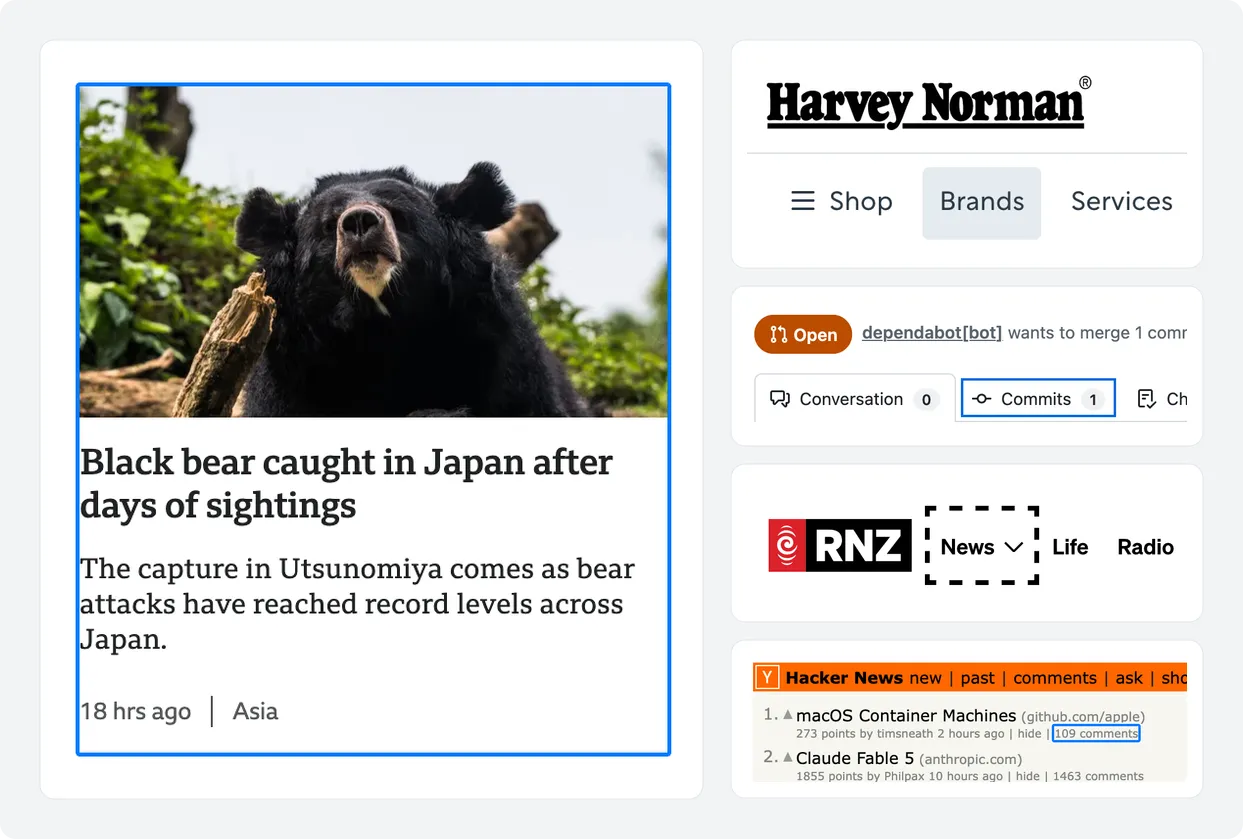
The examples above show a variety of focus indicators in the wild. Outlines are the most common and background highlights are also popular. Some sites use a combination of both, but the important thing is that an obvious visible change occurs when an element receives focus.
Why testing focus appearance is difficult to automate
Automated accessibility testing engines typically struggle to check for focus indicators. Deque’s axe-core, for example, performs a static analysis of the DOM so it cannot reliably trigger the focus state of elements. Other projects like the New Zealand government’s Centralised Web Accessibility Checker (CWAC) use a real web browser to trigger focus, and then perform screenshot comparisons to check for visual changes. This is a more reliable method, but it can be slow and resource-intensive, which is why it’s not commonly used in automated testing tools. CWAC’s own focus_indicator audit only checks the first 10 focusable elements on a page for this very reason.
How A11y Pulse tests for focus appearance
You might already know that A11y Pulse’s scanner runs in a real web browser. This gives us the unique ability to interact with the page in ways that static analysis tools cannot. When we began developing our Focus Appearance audit, we knew that we needed to build something that could reliably detect focus indicators for focusable elements on the page without adding significant overhead to our scans. We also needed to ensure the audit was as accurate as possible, with very few false positives or negatives.
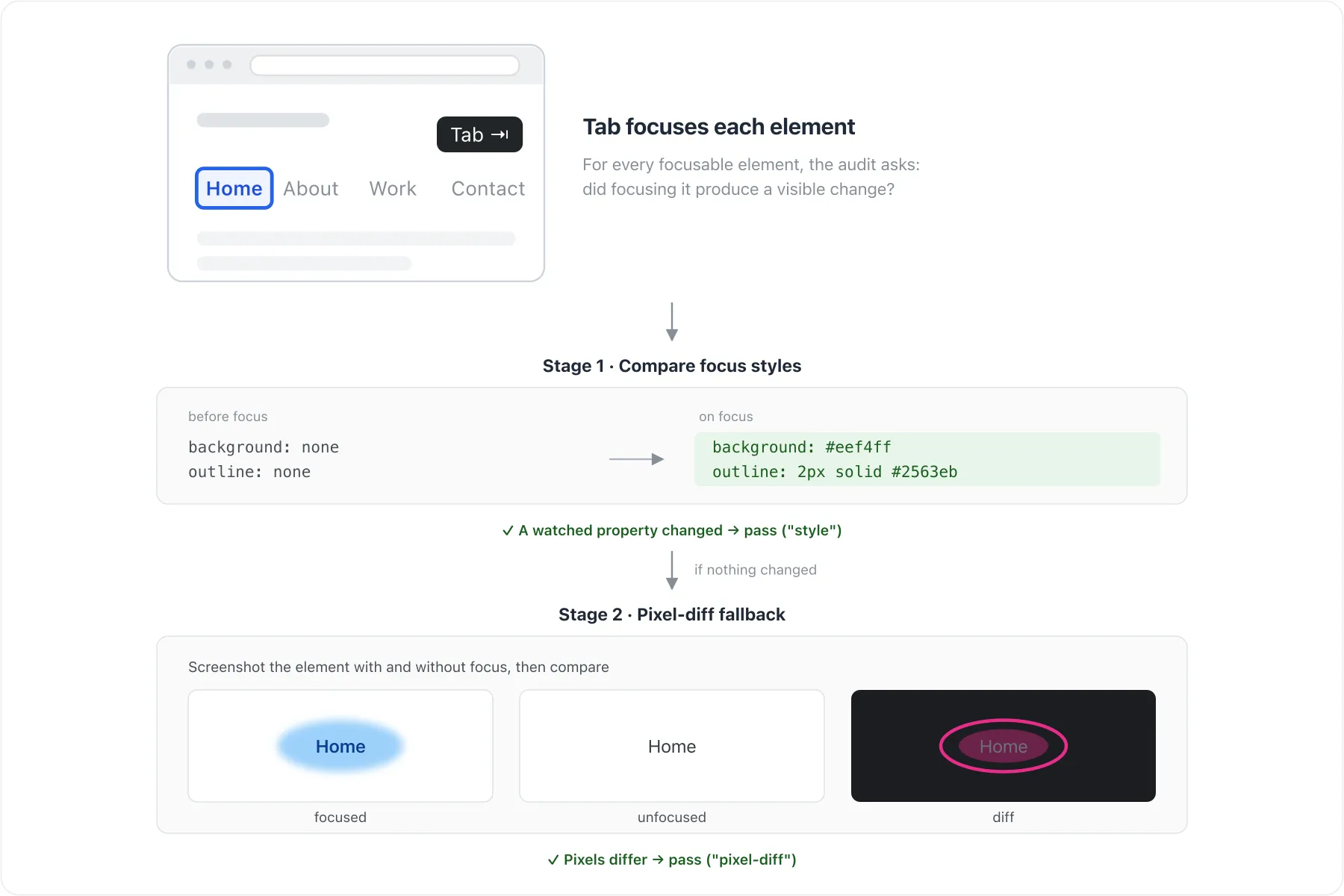
Our Focus Appearance audit tests elements in two stages. We iterate through focusable elements by pressing the Tab key like a real keyboard user would. The first stage involves comparing each element’s computed styles before and after focus. We check for changes in certain CSS properties that are commonly used to indicate focus such as outline, box-shadow, and background-color. If we detect any style changes, we consider the element to have a visible focus indicator. This stage is very fast and reliably identifies most focus indicators, however it is intentionally conservative to avoid false negatives. This is where the second stage comes in.
If the first stage does not detect any changes in the focus-relevant styles, we take screenshots of the element in both its focused and unfocused states. The screenshots are clipped around the element for memory efficiency, and the clips are normalized to account for layout changes such as margin, padding, or element dimensions. We then perform a pixel-by-pixel comparison of the two clips to check for any visual differences. If we find a significant difference, we consider the element to have a visible focus indicator.
The road to WCAG 2.4.13 compliance
In its current form, our Focus Appearance audit can only verify compliance with WCAG 2.4.7, which requires a visible focus indicator to be present but does have any requirements for the indicator’s appearance. WCAG 2.4.13 is more strict, going so far as to specify perimeter width and contrast requirements.
Research is still ongoing, but we are confident that a future version of our audit will be able to reliably check for WCAG 2.4.13 compliance.
Soon to be source-available
While this audit is only available to A11y Pulse customers right now, we plan to release the source code for it in the near future. Our goal is to improve the state of web accessibility testing for everyone, and we believe that making our code available is an important step towards this goal. Keep an eye out for an announcement in the near future.
Try it out for yourself
If you’re interested in trying out our new Focus Appearance audit, it is immediately available to all A11y Pulse customers. Any scans run from today will include results for this new audit, so you can start identifying and fixing focus appearance issues on your site right away.
Not using A11y Pulse yet?Sign up for a free trial and see how easy it is to bring continuous accessibility testing into your team's workflow.
Questions? We would love to hear from you. Drop us a line at [email protected].