Scripting with A11y Pulse just got a whole lot better!

Scripting is one of A11y Pulse’s most powerful features. Not only does it allow you to test the accessibility of pages behind logins, it also lets you test specific user flows so you can verify that your web apps are accessible from end to end.
This week we made our biggest-ever update to the scripting feature: you can now test logins protected by 2FA, set headers, cookies, and local storage values, mark steps as optional, use new built-in variables, and our script editor now helps you validate scripts as you edit them.
2FA logins with totp()
You can now test the accessibility of logged-in web applications that require 2FA/MFA using the new totp() function. Time-based One-Time Passwords (TOTP) are the de facto 2FA standard defined in RFC 6238. This function works like a password manager or authenticator app: you provide it with your 2FA secret key, and it generates a 6-digit code to authenticate with. We recommend storing your 2FA secret key in your Secrets.
// Open the login page
navigate("https://app.a11ypulse.com/auth/login");

// Fill out the username and password, then click Login
fill("#username", "[email protected]");
fill("#password", secret("a11y_pulse_password"));
click("#login");

// Enter the 2FA code and click Login again
fill("#code", totp(secret("a11y_pulse_2fa_token")));
click("#login");
More browser control with setHeader(), setCookie(), and setLocalStorage()
These functions give you more options to seed the state of our scanner’s browser before it tests your pages. Whether you use them for authentication, hiding cookie consent banners, or controlling A/B testing variations, we’re sure they will help you extend your accessibility testing.
Read the scripting reference for these functions to learn more.
// Add basic authentication to all requests.
setHeader("authorization", "Basic YWxhZGRpbjpvcGVuc2VzYW1l");

// Add a custom header to all requests on cdn.a11ypulse.com.
setHeader("x-cache-debug", "1", "https://cdn.a11ypulse.com/*");
Mark steps as optional
We’ve added a new “modifier” to our scripting language: .optional(). This enables you to tell our scanner that a step is allowed to fail, and shouldn’t cause the scan to be aborted. This is particularly helpful for dismissing cookie consent banners or interstitials that may not always be present on the page.
See the optional modifier reference for more information.
// Dismiss a cookie banner if one appears, without failing the scan if it doesn't.
click("#cookie-banner button.accept").optional();
New built-in variables
Three new variables are now available to help your scripting:
PAGE_URLis the URL of the page that is about to be scanned.SCAN_DATETIMEis an ISO 8601 string of the time that the current scan was started, e.g.2026-07-14T18:30:00.000Z.RANDOM_STRINGis a random 32-character hexadecimal string that is consistent across all pages in the current scan, e.g.3f9a1c2e5b7d8f0a4c6e2b1d9f3a7c58. This is helpful if you need a unique-but-constant string like a random username.
More information about these variables can be found in the scripting reference.
More powerful script editor
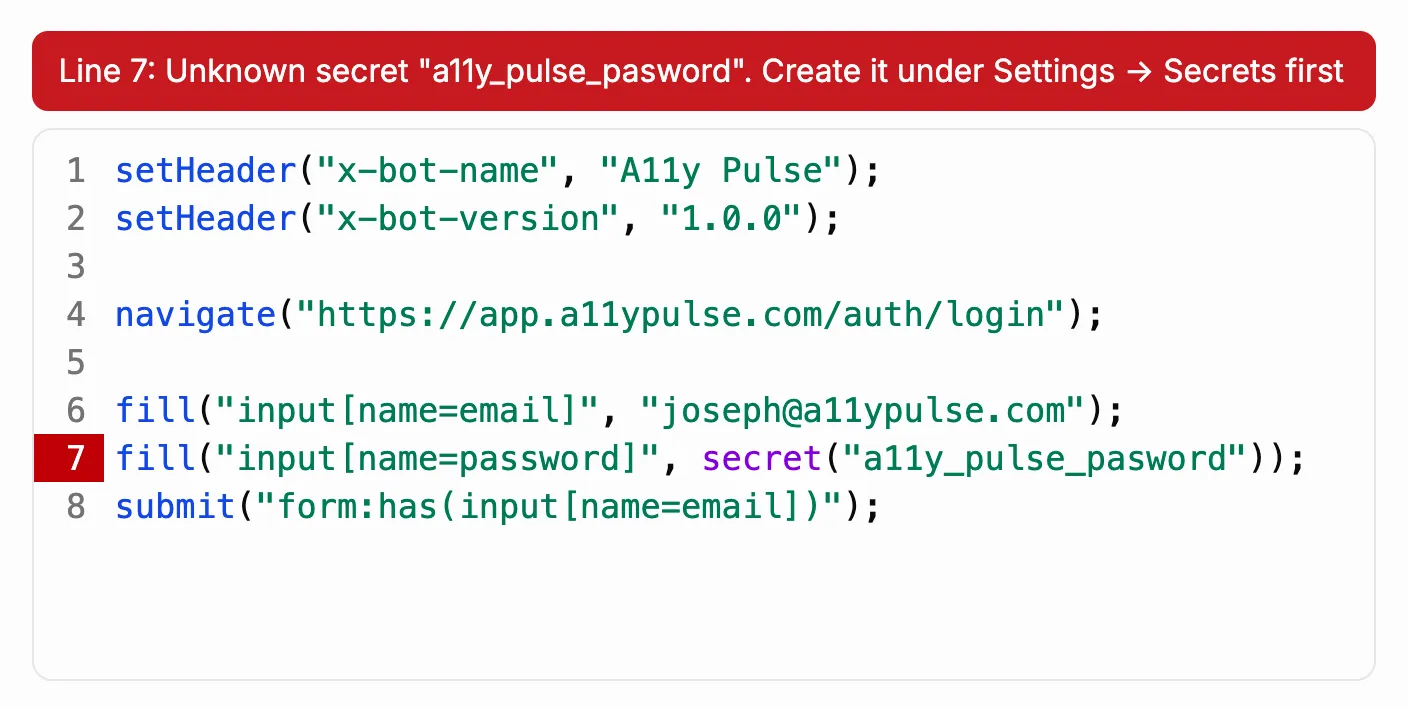
Our script editor has gone from a plain text box to a simple-yet-powerful code editor with syntax highlighting. Scripts are now also validated on save, so you can find mistakes sooner. Validation includes things like:
- Scripts that are missing a
navigate()call - Invalid function or variable names
- Wrong number of arguments for a function
- Trying to use a secret that doesn’t exist
We hope all of these changes make your scripting experience easier and more pleasant.