A11y Pulse Audits
Contents:
- What audits does A11y Pulse run?
- Why does another tool report issues that A11y Pulse doesn’t?
- What does a failed audit mean?
- Does passing every audit mean my site is WCAG compliant?
- Why can’t an automated scan check everything?
- How are issues reported in A11y Pulse?
What audits does A11y Pulse run?
A11y Pulse runs its own bespoke accessibility scanner that builds reports from several different audit sources. One source of audits is axe-core, the open-source accessibility testing engine developed by Deque. axe-core also powers commercial accessibility products such as Deque’s axe DevTools and axe Monitor, as well as widely used tools such as Google Lighthouse and Microsoft Accessibility Insights.
A11y Pulse does not rely on axe-core alone. We run our own additional audits that go above and beyond what is covered by axe-core. Whereas axe-core inspects the page statically as it is delivered, our own audits drive the page like a real user would and check for accessibility issues that only appear when the page is interacted with.
All of A11y Pulse’s own audits are source-available in the A11y-Pulse/audits repository on GitHub.
Why does another tool report issues that A11y Pulse doesn’t?
Two different accessibility tools almost never return the same number of issues for the same page. There are several reasons for this:
-
Each tool works differently. As well as having different audits, each tool has its own way of scanning pages. A11y Pulse loads pages in a real Google Chrome browser and simulates how a real user would interact with the page. Other tools may not use a real browser, or use a different browser, or may not simulate user interaction. All of these differences can produce different results.
-
Some tools report uncertainty as failures. A11y Pulse generally leans towards having as few false positives as possible. This means that it will only report issues that it can confirm with a high degree of certainty. Other tools may report issues that they cannot confirm, leading them to report a higher number of issues than A11y Pulse.
-
Each tool has its own “best practice” audits. Most accessibility tools include their own set of best practice checks in addition to WCAG compliance checks. These audits are often reasonable, but they are not the same as WCAG success criteria and they carry no compliance obligation. A11y Pulse clearly labels its findings with either the WCAG success criterion or as a Best Practice. See How are issues reported in A11y Pulse? for more information.
-
Website content can change over time. Accessibility scanners can only report issues that are present at the time of the scan. On websites that change frequently, a scan performed by one tool may find issues related to content that is no longer present when scanned by another tool.
What does a failed audit mean?
A failure means that A11y Pulse found something specific and reproducible on your page. Every issue names the elements involved and gives you a CSS selector and a sample of the HTML, so you can go and look at it yourself.
Most issues are tied to a WCAG success criterion, and the audit will tell you which one. If you are working towards a conformance claim, that is the criterion you need to satisfy. Some issues are labelled as Best Practice. These are worth taking seriously, but they are advice rather than an obligation.
Automated tests can still be wrong. When you believe an A11y Pulse issue is a false positive, or a deliberate exception you have reviewed and accepted, you can use our Ignored Audits feature to record your decision.
Does passing every audit mean my site is WCAG compliant?
No. A clean scan means we tested everything we can test automatically and found nothing wrong. It does not mean the page is compliant.
There are two reasons for this. The first is coverage: no automated accessibility scanner can test every WCAG success criterion. While we believe that A11y Pulse covers more WCAG criteria than most other automated tools, we still cannot test everything. The second reason is that some automated checks can only confirm that something exists, not that it is actually good.
Why can’t an automated scan check everything?
Because a large share of WCAG is about meaning, and meaning requires human judgement. A few examples:
- 1.1.1 Non-text Content. A scan can confirm an image has alt text. Whether that text conveys what the image conveys is a judgement about the content.
- 1.3.2 Meaningful Sequence. A scan can read the order of elements on a page. Whether that order preserves the meaning of the content is a judgement about the content.
- 3.3.3 Error Suggestion. A scan can find an error message next to an invalid field. Whether it actually helps someone correct the mistake is a judgement about the content.
No automated tool can resolve these with absolute certainty. Any tool claiming to check every success criterion automatically, or to make a site compliant without human review, is overstating what automation can do.
Automated accessibility scanners like A11y Pulse are a tool to help you find issues and prevent regressions, but they cannot replace a manual audit. A manual audit is the only way to confirm that your site is actually accessible and WCAG compliant.
How are issues reported in A11y Pulse?
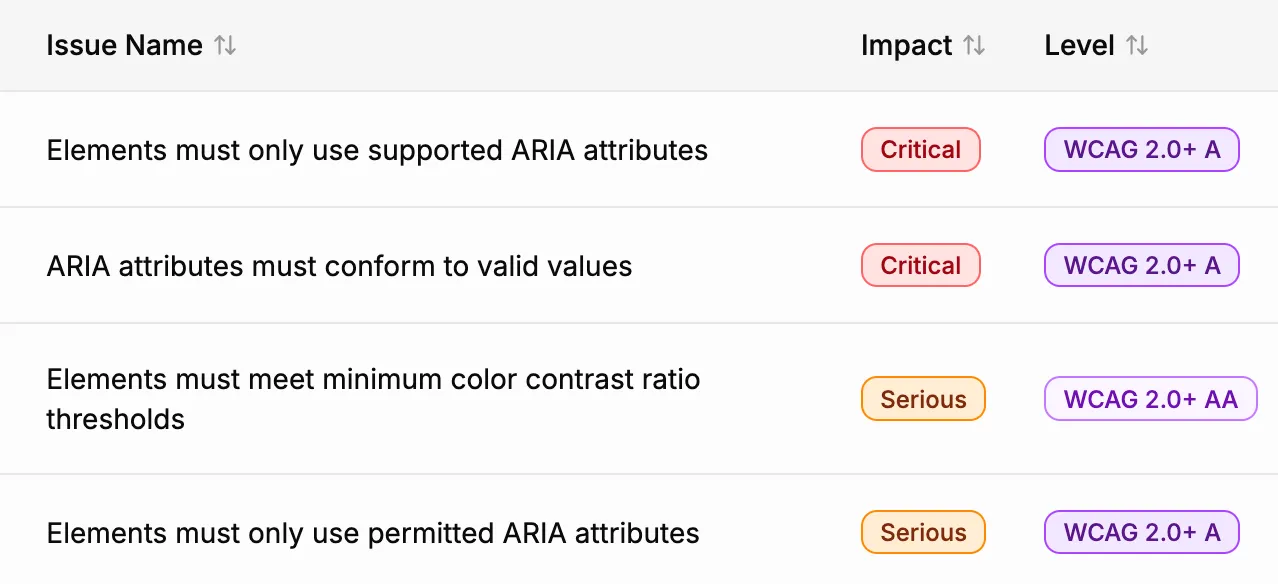
Every issue surfaced in A11y Pulse carries an impact (critical, serious, moderate, or minor) and a conformance level badge like WCAG 2.0+ AA. Issues that do not map to a success criterion are labelled Best Practice.
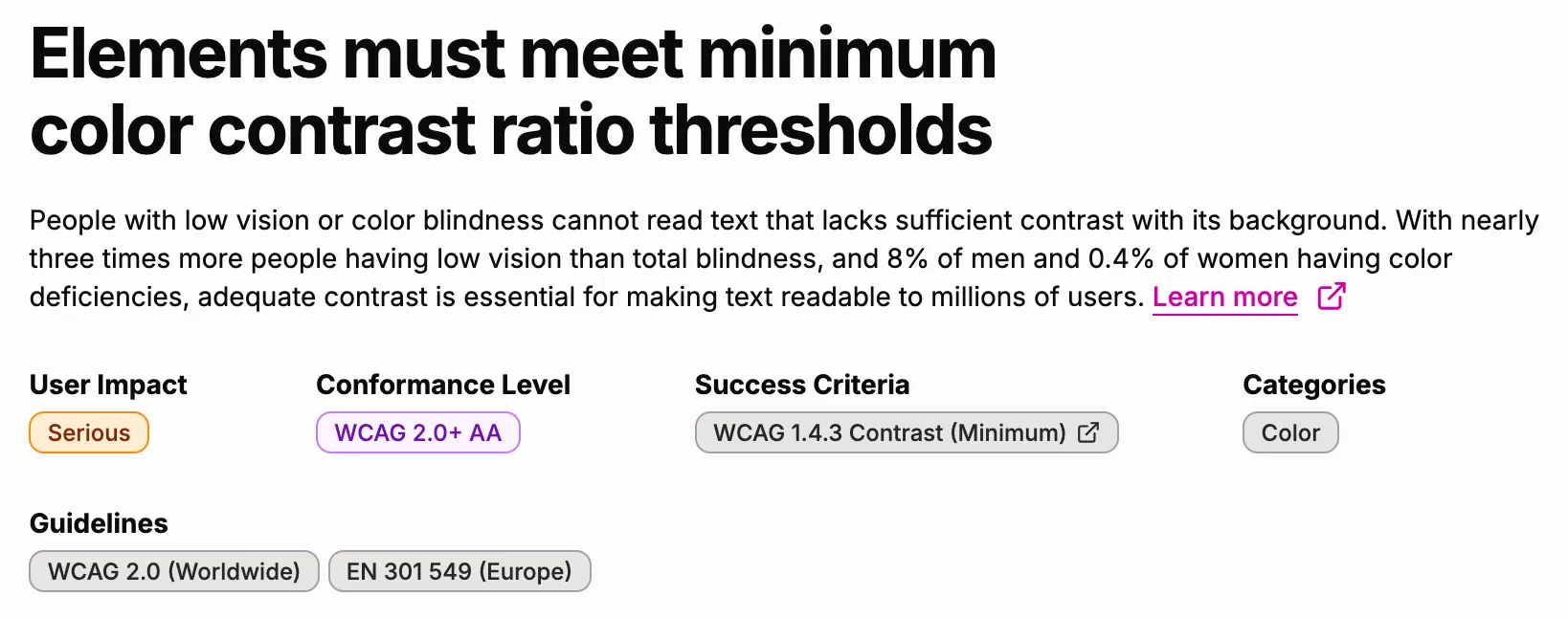
On issue details pages, A11y Pulse also shows the WCAG success criterion that the issue relates to (if any) along with the relevant guidelines.
A11y Pulse is dedicated to being at the forefront of accessibility testing and finding issues that other tools do not. If you believe another tool has identified a WCAG issue that A11y Pulse does not detect, please let us know by emailing [email protected].
Related documentation
- WCAG CoverageEvery WCAG 2.2 success criterion, what it asks for, and whether A11y Pulse checks it automatically today.
- Context Change on Focus AuditHow A11y Pulse detects unexpected context changes triggered merely by focusing an element.
- Focus Appearance AuditHow A11y Pulse detects interactive elements that do not show a visible focus indicator, and how to read and act on the results.
- Focus Not Obscured AuditHow A11y Pulse detects focused elements that are completely hidden by sticky headers, footers, banners, and other overlays.
- Ignoring IssuesUse the Ignored Audits feature to reduce false positives and document exceptions in your accessibility testing process.